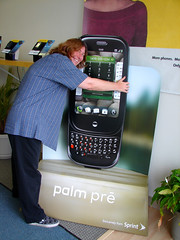
 When I picked up my new Palm Pre smartphone last week, one of the store employees said, “You must have been waiting for this phone for a long time.” He could tell I was excited about it. I told him I’d been waiting for this phone for nine years, six of them on Palm Treos and a Centro, waiting for the next leap.
And now that I finally have it, I can say that while it’s quite clearly a first generation device, I love it. This post will explain why, but it won’t be a comparison of the iPhone versus the Pre. I’ve only played with an iPhone a couple of times, so it wouldn’t be fair, plus everyone knows I’m not a fan of Apple, so I can’t really be objective about this. So instead, this will be a review of the Pre from the perspective of a Treo/Centro owner wondering if she should upgrade, because that’s the question I’m getting asked the most. Back in 2003, I started a popular page called What’s on My Treo 600 that listed all of the apps I used and as a result, I heard from Palm owners for years (and occasionally still do), so this is an area I know well.
In fact, a lot of my issues with the Pre come from features the Treos/Centros did better, but I’ll also describe what’s new, both the good and the bad. As a result, this will be a long review, so skip this post if you’re not interested in smartphones or the Pre.
Let’s start with the Pre’s problems, because there are quite a few of them. There are a lot of little details that are just annoying and even worse, time-consuming, as well as some bigger issues.
Boooo
1. My biggest gripe with the phone is the lack of an expansion slot, limiting me to 8GB of memory. While early adopters are living more and more in the cloud, it’s not enough yet to rely completely on it for media. It also doesn’t help on airplanes, so Palm really needs to figure out a way to increase memory, either internally or via a MicroSD slot like the Centro had.
2. LED notifications are my second biggest issue with the phone. On my Centro, there was an LED that lit up orange when I had voicemail waiting, red when the phone was charging, and green when it was fully charged. Years ago, I downloaded an app called “Butler” that turned the LED green when new email or text messages came in. However, on the Pre, there seems to be no LED indicator whatsoever, which is a huge issue for someone who doesn’t want to be staring at her phone every minute. I want the phone to do the work, and the lack of LED notifications on the Pre, even acknowledging a full charge, bugs the heck out of me. The lack of an LED light means an app can’t fix this for me, either.
There are also other inexplicable quirks that are frustrating for former Treo/Centro owners. Like the fact that there’s no way to forward a text message, and there’s no character count when I’m typing one. That’s not a bad thing when I’m texting a single person, as Sprint now automatically divides the text into multiple messages, but it doesn’t work well at all if I’m sending texts to Twitter or Facebook. Hopefully these kinds of things are just oversights that will get fixed in software updates pretty quickly.
3. The keyboard is about the same as the Centro, so it’s not an issue for me, but the lack of the Keycaps program and the ability to add it is a problem. I realize this is purely my behavior based on how I had customized the Centro, but the ability to tap a key twice to get the symbol or hold down the key for a capital letter cannot be overestimated in terms of efficiency. And the Pre’s predictive text dictionary isn’t strong enough to overcome this deficit yet, so I have to hold out hope that we can get KeyCaps back someday.
4. The multitasking feature is fantastic (more about that in the “plus” list), but sometimes it hits the wall at the weirdest times. Usually, I can keep email, text messages, and the web up in individual cards and not have a problem. I can even open Pandora or the App catalog or a couple of other websites and be fine. But every once in a while I’ll get messages that I can’t open a new card, even when I’ve closed most apps. In fact, at one point, the Pre told me I couldn’t open the App catalog even when nothing else was open. I rebooted to clear out the memory and then it was fine, but I haven’t been able to find a pattern to it, other than to know I can’t have too much else open when I want to play Sudoku.
5. While I would never call “swipes” and “gestures” intuitive, I’ve gotten used to them pretty quickly. I do miss the navigation pad on the Centro, but I’m sure I’ll get used to the new ways of doing things. I mention it only so Treo/Centro owners know what they’re getting into. I still press the pearl button to take a picture, even though that takes me out of the camera app. I’m still learning to tap on the screen to do a lot of things, but I’m sure that will get better in time the more I use the Pre.
6. The email program is really great and really annoying. I’ll mention the good stuff below, but the fact that I can’t do multiple deletes in one task from the inbox or delete a message and go directly to the next one is truly frustrating. I really dislike things that waste my time, and this is one of them, so I hope Palm fixes it pretty quickly or someone comes up with a better email app. At least it’s easy (and even fun!) to swipe spam off the screen to delete it.
7. There are some quirks in the web browser, although overall it works very well. One of the sites I use the most, Google Reader, has an annoying tic on the Pre where when I tap on “mark all of these read,” it reloads the page with the next items but remains at the bottom of the page. I then have to scroll up to see the top of the page. This doesn’t happen on all sites, but when it’s one I use a lot, it’s a frustrating time-waster.
8. The lack of a public SDK that lets anyone develop an app is truly becoming a problem, which is surprising coming from the company that invented cellphone apps. In fact, the ability to completely customize a Palm phone was always one of its best features, so it’s troubling that Palm is frustrating its users in this way.
In addition to the fact that developers could fix some of the problems I’ve noted above, waiting for the big name partners to come through is proving a trial. For example, in the photos app, I can set up an account for uploading pictures, but only for Facebook and PhotoBucket. Huh? Yep, no Flickr. That’s just bizarre, and while I can continue to upload pictures to Flickr via email, the Pre is supposed to make things easier and it’s not doing that in all of the areas where it should be. If Flickr isn’t going to create the app or pay to be listed in the native one, a developer will have to create it to make up for this shortcoming. But no one can until that SDK is released.
I fully believe that the Pre’s app catalog has the potential to rival and even exceed that of every other phone, but the longer Palm waits, the more catch-up there will be. Things have changed since Palm phones were the only ones that used apps, and offering new ones is now a standard, not an option. With the rumor that iPhone apps can easily be ported to the Pre and a community that traditionally loves to hack, Palm is losing credibility on this one every day we go without the SDK.
I also want to address battery life as both good and bad. For as long as I’ve had a smartphone, I’ve used up the battery like crazy, first pulling in email and surfing the web, later gobbling up unlimited text messaging plans for lunch. If you’re a power user, you have to expect that you’ll need to power up at least once in the middle of the day if you expect to make it all the way through the evening. I think that’s just a fact of life now.
My friends who have a Pre and don’t use it as much as I do seem fine on battery life. If I watch a couple of videos, stream music, surf the web, and use the push email, I’ll need to recharge a couple of times a day. I’m not a good barometer, because I’d need to recharge a couple of times a day no matter which phone I use. With chargers at work and at home, though, I haven’t felt a need to buy a second swappable battery, at least not yet. We’ll see what happens when I start traveling again. This issue is a wash for me, but it might vary for others. If the Pre’s features make you use it more, expect to power up more.
So those are the major things that have been bugging me, and luckily they’re mostly fixable through software updates and won’t require hardware upgrades (although more storage might be worth it). So let’s jump in to the good things about the Pre, because the good is *really* good.
Hooray!
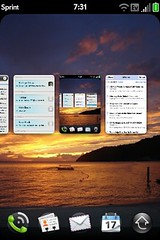 1. The multitasking is by far the best feature about the Pre, and this alone makes it worth it for me. I can have email (for both of my major accounts) running in one card, text messages in another, a web search in another, and a Twitter client in another, all at the same time. Depending on the Pre’s temperament at that moment, I may also be able to listen to music, check the weather, or find movie times for a show near me. And if a website or Tweet (for Twitter) is slow loading, I can just flip to a different card while it finishes. I expect to be radically more productive at conferences and in meetings just because of this feature.
When multitasking is working properly (which is probably 90% of the time), my phone acts the way I expect to it, like my laptop. I don’t have to close one app to open another one, and I don’t spend any time during the day waiting for my standard apps to load. I can tap on a URL in an email or text message, and it will open a web browser while leaving the message open so that I can refer back to it. If I reply to a message, it comes up in a new card so that I can easily refer back to the text in the original message. I can also go look something up and come back to the message I’m working on. I think at one point I had ten different cards running at once. I can’t stress enough how useful this is, and in many ways, it makes up for a lot of the time-wasting annoyances I listed above.
2. The Touchstone charger is beyond cool – it’s incredibly practical and convenient. It’s one of those things that permeates your expectations once you start to use it. While it’s an expensive add-on for the Pre, almost everyone I know who has the phone bought one because it’s so convenient. In fact, I just bought a second one for work, because this is one of those moments where I’ve gotten to taste the future, and I want it all, now.
Think for a minute about how much time you waste plugging in and unplugging your phone. It’s something we try to make as painless as possible by putting the charger in a convenient spot, but we take for granted that every day or two, we’ll have to actually stop what we’re doing, look at the phone, and work the cable into it. It sounds like a small thing and it is, but you don’t even realize what a time waster that is until you don’t have to do it anymore. Being able to walk in the door when I get home and just set the Pre down and not hassle with cables is pretty phenomenal. It’s just as great at work, too, where the slant of the Touchstone makes it easier for me to check messages as they come in. It also serves as a handy desktop clock, and when I head out to a meeting, I just pick my phone up.
I know it doesn’t sound like much, and it’s certainly not a big enough feature to pull someone away from a different phone to the Pre, but this is the future, my friends. I wrote about a couple of products that promised this technology several years ago in a “Product Pipeline” column, and now it’s finally starting to happen. All this really does is make me impatient for this to become available for my laptop, but if you want a glimpse into how technology will make life better, this is one of those things. The way it just works is completely full of win.
As a side note, I haven’t experienced the resetting problem a few people have reported with the Touchstone, and I don’t think the back gets all that warm. In fact, I think it gets warmer when I use it as an actual phone and talk on it, but then I don’t actually talk much on my cellphone.
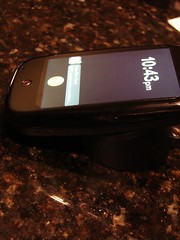
Palm Pre resting on the Touchstone wireless charger
In addition, I prefer the conductive back cover that comes with the Touchstone. It makes the Pre less slippery, and it makes it easier to slide the phone open with one hand. For me, the Touchstone is a win all the way around and back.
3. Along those same lines, I very rarely use a cable with my Pre at all thanks to the wireless, push Exchange synching. This would work with Gmail and other email providers, as well, but it’s particularly impressive to a past Treo/Centro owner like me who’s had to manually synchronize bits and pieces over the years. When I first set up the phone, I just put in my Exchange info once in the email client, and it magically started syncing my email, calendar, contacts, and tasks. Unfortunately, it’s not grabbing my memos for some reason, but everything else is there, and it all happens in real-time without me ever plugging into my laptop. For business level users, this is indispensable stuff, and it shows how Palm pays attention to that market. You don’t have to install apps via the Palm Desktop anymore either, as it all happens “over the air.” In fact, there is no Palm Desktop anymore, and the Pre doesn’t even come with an installation disc.
4. The keyboard is a subjective measure, but I’m one of those people who wants a physical, tactical keyboard for typing, so the Pre is perfect for me. I got used to the smaller version on the Centro, so the size isn’t an issue for me, although I could see where it might be for people with larger fingers. That said, the Pre fits in my hand very well, and I can still type with one hand if I need to. In fact, I can completely operate the Pre with one hand, which was always one of my favorite features of the Treo/Centro. I especially like the curve of the phone, which doesn’t feel like a square brick, and it fits easily in my pocket even more comfortably than the Centro did.
5. Despite the things I dislike about the email program, the way it combines my inboxes into one is pretty cool, and it mimics how I think about my email. I can still view each inbox separately but I’m finding the combined view very useful, and when I reply to a message, the Pre automatically knows which account to use. The attachments are seamless, with plain text files appearing in the email itself. Plus, with the multitasking, I can open the attachment and still read the email at the same time. The integration is really stellar. In fact, sometimes the push is so great that I get messages on my phone before they appear on my computer.
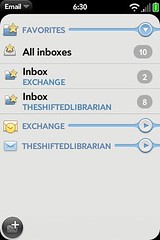
Email on the Pre – combined inbox or view each one individually
6. The toolbar/notification area is very useful, and it’s a huge improvement over the way past phones have handled interruptions. When a new email or text message comes in, it doesn’t fill the whole screen. This is as useful as some of the tics are annoying. You can deal with the incoming notice by tapping on it to open it in a new card, and thanks to the multitasking feature, you won’t lose what you were working on or have to re-open it. Or, you can ignore the notice and just keep doing what you were doing. Making these notices less of an interruption makes me more efficient, which I appreciate. It’s clearly one of the benefits of starting over and creating an operating system designed for this type of device.
The same thing is true with the app integration into the toolbar. When I listen to music, whether in the native app or via Pandora, the Pre puts the controls right in the toolbar so they’re always available. I can envision a day when that toolbar gets too crowded, but right now, this is another example of the Pre working the way I do on my laptop. It’s a killer feature for me, because I don’t even have to switch cards to control the music.
Conclusion
There are lots of other small quirks or cool things, but these are my overall impressions after a week with the Pre. Major enhancements to the Palm line include the 3-megapixel camera (with flash), much better Google Maps integration, WiFi, GPS turn-by-turn directions, YouTube videos, and they’re all well done on the Pre. The backup feature is a huge improvement, as I found out when my first Pre died and I had to replace it with a new one. I was able to just enter my profile name on the new device and almost everything synchronized down to it from Palm’s server. There were some app preferences that I had to re-enter, but I don’t know if that’s standard or if the first Pre just hadn’t fully synchronized yet. Either way, it’s nice to not have to worry about backing things up, although it does raise some privacy concerns for me.
As do the location-aware services, which I turned on in exchange for the convenience of finding restaurants and movies around me, along with the customized weather and navigation services. That’s another post, though, so suffice it to say that while I don’t plan to ever broadcast my location in real-time, I still struggle with this issue. It’s not unique to the Pre, though, so it’s a wash in the plus/minus equation.
So should you consider getting a Pre? If you can get the rebate that makes it $199, I think it’s well worth it, especially if you’re one of those people who likes the cutting edge. I’m really looking forward to seeing what the hackers and app developers do with it, and the success of the phone will depend quite a bit on what happens in that arena.
On our computers, we’re living more and more in a web browser, and on our phones, the early adopters are spending more and more time in these tunnels (apps) that customize the experience and make it more convenient. Convergence was always going to happen, but I’m not sure we realized the road that would get us there would start with apps. It won’t stay that way forever, but it’s the transition bandaid of the moment, and if the Pre can compete on apps, it will bury the bar with multitasking.
It’ll need a stronger processor and more storage to get there, but it’s a very solid first generation device, especially for one that’s been completely rewritten from the ground up. It’s not for everyone (no phone is), but if it can deliver on the promise of its potential, the future will arrive that much faster. I’d give the Pre two thumbs up if I didn’t think it would make it easier for someone to pry it out of my hands. I’ll raise that to four thumbs when that SDK is released and we get to see what the phone can really do.
Come on, Palm – let’s get moving!